By PDF Logic Team · Updated
A4 vs US Letter: Preparing Documents for International Sharing
Compare A4 and US Letter dimensions, set the intended size before PDF export, and avoid clipped text when printing documents across regions.
A4 is 210 × 297 mm. US Letter is 8.5 × 11 inches, or 215.9 × 279.4 mm. A4 is taller and narrower; Letter is shorter and wider. Choose the size required by the recipient in your original document before exporting to PDF, then check the exported page dimensions and layout.
Adobe’s A4 reference describes the A4 dimensions. As a concrete US example, USAJOBS specifies 8.5 × 11-inch documents. Sources checked September 8, 2026. A recipient’s explicit specification should guide your choice.
What changes between the two sizes?
| Paper | Width | Height |
|---|---|---|
| A4 | 210 mm | 297 mm |
| US Letter | 215.9 mm | 279.4 mm |
Using those dimensions, Letter is 5.9 mm wider and 17.6 mm shorter than A4. The practical effect depends on your margins and content: a paragraph may wrap differently, a table may need more width, or a footer may sit too close to the printable edge.
A PDF also has a file size in bytes. That is a separate measurement. A smaller page does not necessarily produce a smaller file, and compression does not by itself convert A4 pages into Letter pages.
Prepare the source before creating the PDF
- Read the destination’s page-size instruction. If none is supplied, ask the recipient when physical printing or a fixed template matters.
- Choose A4 or Letter in your authoring application’s page setup or layout controls.
- Recheck margins, tables, headers, footers and page breaks after changing the size.
- Export a fresh PDF. If the source is DOCX, Word to PDF can convert it using server processing.
- Open the output in a PDF viewer and inspect page properties. Check more than the first page when the document contains sections or inserted material.
Do not assume that changing a printer preference has changed the document saved on disk. The source layout, the PDF’s stored page dimensions and the paper loaded into the printer are three separate things.
Worked example: a PDF containing both sizes
Our synthetic “paper-size-demo.pdf” contains an A4 first page and a Letter second page. Both remain distinct sizes inside the same PDF. The screenshot shows the actual two-page preview in Organize PDF; the labels inside the example pages identify their dimensions.
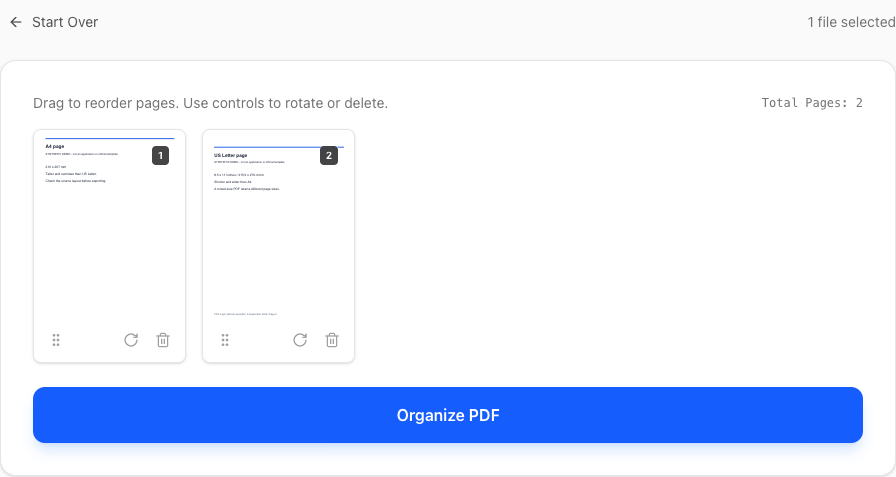
For a real document, inspect the dimensions in a viewer instead of judging thumbnail height. If every page must be Letter, correct the source sections and export again. Rearranging pages in Organize PDF changes sequence; it is not a page-size conversion control.
Print an existing PDF without clipping
For ordinary reading copies, a PDF viewer’s Fit option can scale the page to the selected paper. Adobe documents this in its printing and scaling instructions. Review the print preview, selected paper and orientation before printing a complete document.
Print scaling changes the printed output. It does not necessarily rewrite the page dimensions in the original PDF. If a document includes a scale drawing, label template or other size-sensitive content, follow its printing instructions and verify a measured feature on a test page.
Common questions
Can Images to PDF choose A4 or Letter?
Yes. The current Images to PDF interface offers A4, US Letter and US Legal, as well as Original image dimensions. Choose an orientation, Fit whole image or Fill page, and a margin from 0 to 50 mm. Fit whole image retains the full image and may leave unused space; Fill page can crop edges to match the selected paper. After conversion, inspect every page and confirm its stored dimensions in a PDF viewer when exact size is required.
Should I crop a PDF to change its paper size?
Cropping can hide content at the edges. It is not a substitute for reflowing text to a different source layout, and it does not securely remove information.
Will merging A4 and Letter documents make them one size?
Do not assume it will. Inspect the page dimensions in the merged output; combining files and standardizing their layout are different tasks.
Topics
Continue Reading
More articles you might find useful
USAJOBS Resume PDF: Check Page Count, File Size and Formatting
Prepare a USAJOBS resume PDF with a practical check of the two-page limit, 5 MB file limit, Letter layout and readable text before uploading.
Preparing a Europass CV PDF for Employer Uploads
Review a Europass CV PDF for employer file limits, readable text, accents and page breaks, while keeping the original CV available for future edits.
Make French and German Scanned PDFs Searchable with OCR
Select French or German OCR, choose searchable PDF instead of TXT, and check accents, umlauts, dates and reference numbers in the result.