USAJOBS Resume PDF: Check Page Count, File Size and Formatting
Prepare a USAJOBS resume PDF with a practical check of the two-page limit, 5 MB file limit, Letter layout and readable text before uploading.
Before uploading a USAJOBS resume, check that the PDF has no more than two pages, is 5 MB or less, and uses standard 8.5 × 11-inch pages. USAJOBS recommends PDF to retain formatting, excludes PDF portfolios, and says not to include encrypted or digitally signed documents. These requirements were checked on September 8, 2026; read the current USAJOBS resume guidance and your job announcement before applying.
This guide covers the file review after you have written your resume. PDF Logic does not assess your qualifications, score your resume or submit an application.
Start with the resume source
Keep an editable master and a separate PDF for the specific vacancy. A useful local naming pattern is “Alex_Example_Resume_Announcement123.pdf”, with the vacancy identifier replaced by the real one. Avoid an ambiguous collection of files named “final2” and “final-new”: it makes selecting the wrong attachment too easy.
- Finish the text in your authoring application or the USAJOBS resume builder.
- Check page size and page breaks in the source. A4 and US Letter differ; see our paper-size guide if your editor uses A4 by default.
- Export to PDF. If you have a DOCX file, Word to PDF is another option; it uploads the document for conversion.
- Open the exported file independently. Font substitution or layout changes during conversion can move a line onto another page.
Worked example: review a two-page sample
We created a fictional, two-page Letter document called “resume-demo.pdf”. The screenshot shows it loaded in Organize PDF, where page thumbnails help reveal an accidental extra page. This is a demonstration of page review, not a federal resume template or an accepted application.
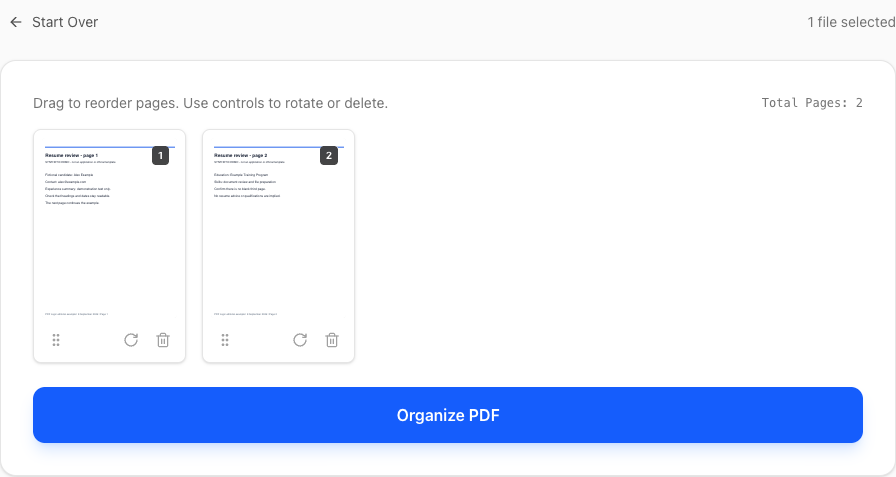
For your own resume, also open both pages at normal reading size in a PDF viewer. Check your contact line, the start and end of each role, and the last line on page two. Select a paragraph, copy it into a plain-text editor and confirm it remains intelligible. This is a practical text check, not a test of every applicant-tracking system.
If an extra page contains necessary information, revise the source and export again. Deleting a page with a PDF tool can also delete the experience you intended to submit. Reducing font size until the page count fits can make the document difficult to read.
Reduce file size only when needed
Check the saved file in your operating system’s file information or properties panel. If it exceeds the upload limit, first remove unnecessary high-resolution graphics from the source. For an image-heavy PDF, try Compress PDF on a copy, then compare every page with the original.
Compression runs on the server. Its Desired Size setting requests a target; it cannot promise every document will reach it. Check the downloaded file’s actual size and readability. A small, text-based resume may already be compact and need no processing.
Check the file selected in the application
- Confirm that the selected filename matches the vacancy-specific copy.
- Review the portal preview where available, including the last page.
- Keep additional requested documents in their appropriate upload slots.
- Save your submitted version locally so you can identify exactly what you sent.
Common questions
Does compression fix a resume that is too long?
No. File size and page count are separate. Compression can reduce stored image data while leaving the number of pages unchanged.
Does a PDF export guarantee the same layout?
No. Inspect the output even if the original looks correct. Converters may substitute fonts or move page breaks; exporting from the original editor can be preferable when precise layout matters.
What if a compliant-looking file is still rejected?
Record the exact message and follow our PDF upload troubleshooting checklist. A file converter cannot resolve an expired session or a portal-side problem.
Topics
Continue Reading
More articles you might find useful
Preparing a Europass CV PDF for Employer Uploads
Review a Europass CV PDF for employer file limits, readable text, accents and page breaks, while keeping the original CV available for future edits.
A4 vs US Letter: Preparing Documents for International Sharing
Compare A4 and US Letter dimensions, set the intended size before PDF export, and avoid clipped text when printing documents across regions.
Make French and German Scanned PDFs Searchable with OCR
Select French or German OCR, choose searchable PDF instead of TXT, and check accents, umlauts, dates and reference numbers in the result.