Preparing a Europass CV PDF for Employer Uploads
Review a Europass CV PDF for employer file limits, readable text, accents and page breaks, while keeping the original CV available for future edits.
Download your finished Europass CV, check the employer’s accepted file type and size, and inspect the PDF before uploading it. Keep your editable Europass profile and original export so that later revisions start from the source. The official Europass CV builder supports creating, downloading and sharing tailored CVs in 31 languages. Its guidance was checked on September 8, 2026.
The upload instructions belong to the employer or application platform. Use the specific vacancy’s requirements instead of assuming that a CV accepted by one European employer will meet another employer’s rules.
Make an upload checklist for the vacancy
Before changing the file, write down the allowed format, maximum size, requested language and any page or naming instructions. Check whether the platform wants a CV and cover letter separately. This small step prevents unnecessary conversions and avoids losing a carefully prepared layout.
For example, if one vacancy requests an English PDF and another requests a French CV, keep separate exports with clear filenames. Changing the filename or running OCR does not translate the content. Review any translated qualifications and role descriptions before submitting them.
Inspect the exported CV in a viewer
- Read the contact details and test the links you intend the recruiter to use.
- Check page breaks around experience, education and language sections.
- Copy a short paragraph into a plain-text editor and examine its reading order.
- Inspect accented letters in names and institutions. For German text, also check umlauts and ß.
- Compare the file’s saved size with the upload field’s limit, leaving some margin if the limit is expressed only approximately.
A successful copy-and-paste check is useful evidence about the PDF’s text, but it does not certify how an employer’s screening software will interpret the entire document. Keep the visible structure easy for a person to follow.
Worked example: decide whether compression is needed
Our “cv-demo.pdf” is a fictional two-page A4 document, not an official Europass template. The screenshot shows it loaded into Compress PDF so you can identify the file and review available settings. The sample is already small; loading it does not establish that compression is necessary.
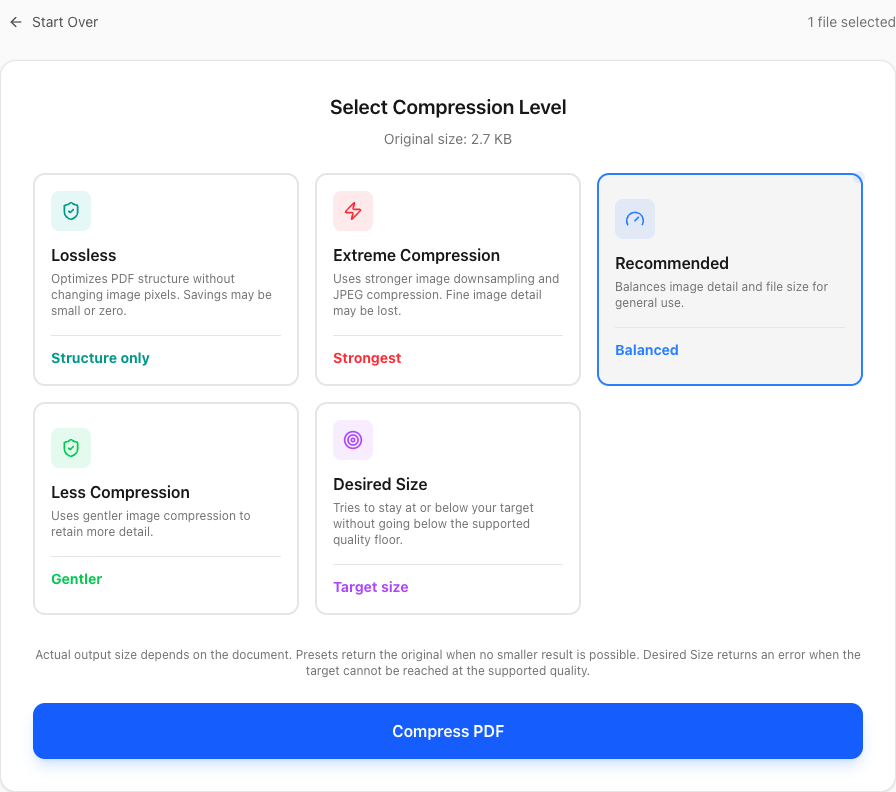
Suppose an employer’s field allows 2 MB and your own export is 2.4 MB. Those numbers describe an illustrative employer requirement, not a Europass limit. Try a conservative compression setting on a copy, download the result, and measure it again. Keep it only if it fits the stated limit and your text, images and links remain usable.
If the result is still too large, return to the CV source and review oversized images. Repeatedly compressing the same output can reduce image quality without solving the underlying problem. The original export remains your reference.
Keep edits in the right place
Revise an existing Europass CV in its source workflow where possible. Converting the PDF back into Word may rearrange columns or spacing and is unnecessary just to change a date. If you maintain a separate DOCX CV, Word to PDF can convert that file, but the result is not thereby a Europass CV.
PDF Logic’s compression and DOCX conversion upload documents to the server. Review the privacy policy and use an approved workflow for personal documents. Neither tool certifies acceptance by an employer.
Common questions
Will a compressed PDF remain editable in Europass?
Do not rely on that. Keep your profile and original export. A PDF processor may change data that another editor uses for re-importing a document.
Should I merge the CV and cover letter?
Only if the vacancy asks for one combined attachment. Separate upload fields usually need separate files; follow the labels and instructions.
What if the portal rejects the file after compression?
Size is only one possible cause. Follow the upload troubleshooting guide to check format, security and the actual error message.
Topics
Continue Reading
More articles you might find useful
USAJOBS Resume PDF: Check Page Count, File Size and Formatting
Prepare a USAJOBS resume PDF with a practical check of the two-page limit, 5 MB file limit, Letter layout and readable text before uploading.
A4 vs US Letter: Preparing Documents for International Sharing
Compare A4 and US Letter dimensions, set the intended size before PDF export, and avoid clipped text when printing documents across regions.
Make French and German Scanned PDFs Searchable with OCR
Select French or German OCR, choose searchable PDF instead of TXT, and check accents, umlauts, dates and reference numbers in the result.