Federal Court E-Filing: CM/ECF PDF Requirements and Rule 5.2 Privacy
Each federal court sets its own CM/ECF limits, from 30 to 75 MB per PDF in the courts we checked, and Rule 5.2 says what to redact. Prepare a PDF that passes.
By the PDF Logic team at Appzotech
Published 8 min read
On this page
Federal courts take electronic filings in CM/ECF as PDF files, and each court sets its own technical rules: the four district courts we checked cap a single PDF at 30, 35, 50 or 75 MB. One rule applies everywhere: under Federal Rule of Civil Procedure 5.2, a filing may show only the last four digits of a Social Security, taxpayer-identification or financial-account number, the year of a person’s birth and a minor’s initials. We read the courts’ pages and the rules on October 21, 2026. Your own court’s ECF procedures, local rules and any standing order from your judge come first, so look them up on the court’s website before you file.
This guide is about preparing the PDF: making it searchable, flattening forms, staying under the size limit and redacting properly. It is not legal advice, and it does not cover what to file or when.
What courts check, with four examples
These rules come from each court’s own pages. They show how much courts differ; they are not a substitute for the rules of the court you are filing in. Appellate and bankruptcy courts publish their own procedures too.
Scroll the table to compare all columns.
| Court | Largest PDF | Other PDF rules on the court’s page |
|---|---|---|
| District of Oregon (updated September 3, 2025) | 75 MB | Every PDF must be text-searchable. No fillable forms: flatten or print them first. No encryption, passwords, JavaScript, internal attachments or embedded audio or video. PDF/A is not required |
| Northern District of California | Under 50 MB; ECF rejects 50.0 MB (50,000 KB) or more | Scan only documents that cannot be converted to PDF directly. PDF/A is not required, but the court says it is least likely to be rejected. No punctuation or confidential information in file names |
| Central District of California (announced August 2, 2019) | 35 MB | One document, or one part of a document, per file. Divide anything larger into sub-volumes |
| Northern District of Georgia | 30 MB | Scan at 300 dpi or less, in black and white unless color is truly needed. Split larger files. Remove hidden code that ECF reports as malformed |
What Rule 5.2 says you must redact
Rule 5.2(a) covers every electronic or paper filing, by parties and nonparties alike, unless the court orders otherwise. A filing that contains one of these items may include only the part shown:
- Social Security and taxpayer-identification numbers: the last four digits.
- Birth dates: the year of birth.
- Names of people known to be minors: their initials.
- Financial-account numbers: the last four digits.
In criminal cases, Federal Rule of Criminal Procedure 49.1 adds a fifth item: a home address may show only the city and state. Bankruptcy cases have their own version of the rule, Bankruptcy Rule 9037. Rule 5.2(b) lists exemptions, such as the record of a state-court proceeding. If the court needs the full information, Rule 5.2(f) lets you file an unredacted copy under seal, and Rule 5.2(g) lets you file a sealed reference list that matches each redacted item to an identifier.
The filer is responsible. Rule 5.2(h) says you waive the protection for your own information if you file it unredacted and not under seal. Check every page, including exhibits you did not write.
Redact so the information is really gone
A black rectangle drawn over a number in a PDF editor hides it on screen and nowhere else. The characters stay in the file, so anyone can copy them, search for them, or delete the rectangle. Real redaction removes the text and image content under the mark.
- Open the PDF in Redact PDF. Marking happens in your browser.
- Select Find text, type the number or name, and choose Mark selected matches, so you catch every occurrence, including headers and footers. To leave the last four digits, search for the part that must go, such as the first five digits of a Social Security number. For scanned pages, use Recognize scanned text first.
- Select Review redactions, then Apply redactions. The PDF is uploaded at this step, and the temporary files are deleted when the job ends.
- Search the downloaded copy for the number you removed. If the search finds nothing, the characters are gone.
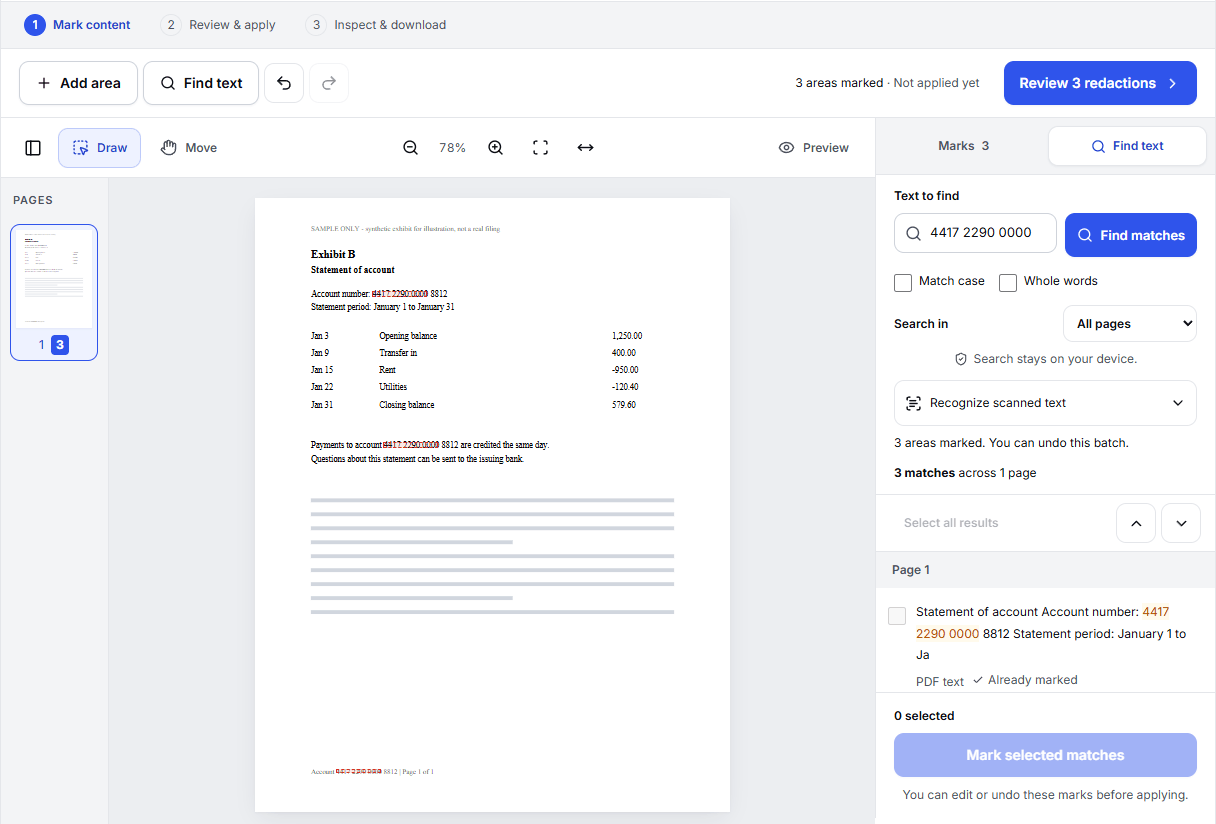
Redact PDF also removes document properties, attachments, comments, links and form fields, because they can carry the same details. The Northern District of California asks filers to make sure PDFs are free of hidden metadata; Edit PDF Metadata shows the title, author and other properties of any PDF in your browser. Our guide to PDF redaction goes deeper.
Make the PDF text-searchable
The District of Oregon requires every PDF to be text-searchable, and a searchable PDF is easier for judges and clerks everywhere. The simplest way to get one is to save the brief or motion as a PDF from your word processor, which keeps the text as text and the file small.
Exhibits that exist only on paper have to be scanned, and a scan is a picture of text. OCR PDF adds an invisible layer of recognized words, so the scan can be searched and copied while it looks exactly the same. It reads the pages in your browser and uploads them only to build the searchable PDF. Check the size afterward, because the text layer adds a little.
Flatten forms and remove what ECF rejects
- Fillable forms. The District of Oregon tells filers not to upload fillable PDFs. Flatten PDF turns the filled-in fields into ordinary page content in your browser, so the answers stay and the fields go.
- Passwords and encryption. ECF rejects locked files. If you know the password, Unlock PDF saves an unlocked copy on our server and deletes the temporary file afterward.
- Scripts, attachments and media. These are rejected too. The District of Oregon notes that printing the file to PDF frequently solves an upload problem, because printing keeps the pages and drops everything else.
Stay under the size limit
Scanned exhibits are where the megabytes come from. Scan text documents in black and white at 300 dpi, as the Northern District of Georgia advises, and use color only for exhibits where color matters, such as photographs.
If a PDF is still over your court’s limit:
- Compress it. In Compress PDF, choose Meet a size limit, enter a number below the limit, for example 29 MB for a 30 MB court, and tick Preserve searchable text and document features so the text stays searchable. Compress PDF uploads the file and takes files up to 30 MB.
- Or split it. Split PDF divides an exhibit in your browser into parts under the limit. Label them clearly, such as “Exhibit A, part 1 of 2”, and attach them to the main document as your court’s procedures describe.
The Northern District of California adds that ECF is less likely to freeze if you submit no more than eight to ten files at a time, whatever their size.
Name files carefully
File names show up in places you might not expect. The Northern District of California asks filers to leave confidential information out of file names and to avoid punctuation, especially periods and parentheses, which can cause errors. “Exhibit-A-Lease.pdf” is safer than “Exhibit A (Lease, signed).pdf”.
A last check before you file
- Your court’s limits: size per file, and any limit per filing.
- Redactions: searching for each removed number finds nothing.
- Searchable text: you can select and copy a sentence.
- No form fields, passwords or attachments.
- Every page is present and in order. Organize PDF shows numbered thumbnails in your browser.
- Plain file names without confidential details.
Frequently asked questions
Do federal courts require PDF/A?
None of the four courts above requires it. The Northern District of California says PDF/A files are the least likely to be rejected and suggests trying PDF/A when ECF reports a malformed document. PDF to PDF/A makes a PDF/A-2b copy and validates it.
Is a black box over the number enough?
No. A drawn box hides the number on screen but leaves it in the file. Use real redaction, then search the result to confirm.
Can I upload sensitive filings to an online tool?
Decide that before you start. Redact PDF, Compress PDF and Unlock PDF upload the file to our server for the job and delete it afterward; Flatten PDF, Split PDF and Organize PDF run in your browser and upload nothing. If your documents must not leave your device, do the upload steps in software you run yourself.
Can PDF Logic file my documents with the court?
No. Filing happens in your court’s CM/ECF system with your own account. Our tools only prepare the PDF.
Try it
Tools for this guide
Each one is free and works without an account.
Spotted a mistake or something out of date? Tell us and we will fix it. Our editorial policy explains how these guides are written.