USCIS Online Filing: Evidence Upload Rules, File Size and Format
USCIS accepts evidence as PDF, JPG or JPEG files of up to 12 MB each, unlocked and easy to read. Prepare scans, translations and large files so every upload goes through.
By the PDF Logic team at Appzotech
Published 8 min read
On this page
USCIS accepts evidence uploads as PDF, JPG or JPEG files of up to 12 MB each, and some forms also take TIF or TIFF. Do not encrypt or password-protect the files, and make sure every page can be read. Those rules come from the USCIS page Tips for Filing Forms Online, which USCIS last reviewed on October 7, 2026; we read it on October 20, 2026. Some older USCIS documents give a 6 MB limit. If the uploader in your account shows a different limit, follow the uploader.
This guide is about the files: turning paper into uploads an officer can read, bringing a large file under the limit, and handling translations and photos. Which evidence your case needs is a separate question, answered by the form instructions or by an immigration attorney or accredited representative.
The upload rules at a glance
Scroll the table to compare all columns.
| Rule | What USCIS says | How to check your file |
|---|---|---|
| File type | Generally PDF, JPG or JPEG; TIF or TIFF for some forms | Look at the end of the file name. A photo from an iPhone is often .heic and needs converting |
| Size | No file larger than 12 MB | Properties on Windows, Get Info on a Mac. Aim for 11 MB or less to stay clear of rounding |
| Protection | Do not encrypt or password-protect files | Open the file: it should not ask for a password |
| Readability | Scan or photograph each document; every image clear and all text readable | View each page at 100% and read the smallest print |
| Foreign-language documents | Upload the original, a certified English translation and the translator’s certificate for each document | Have all three ready before you start |
The same rules apply whether you complete the form step by step online or upload a completed form as a PDF. You can also add evidence later: while a case is pending, USCIS shows an additional evidence uploader at the bottom of the case’s tab in your online account.
Turn paper documents into clear files
A flatbed scanner gives the cleanest result. Scan in color or grayscale; 300 dots per inch is plenty for small print and keeps files a reasonable size. Save straight to PDF if the scanner offers it.
A phone works too, with a little care:
- Lay the page flat in even light. Daylight from a window beats a lamp, and switching off the flash avoids a glare spot over the text.
- Fill the frame with the page and hold the phone parallel to it, so the text is not stretched toward one edge.
- Photograph every page, including the back of a certificate if it carries stamps, seals or writing.
- Turn the photos into one PDF per document. Scan to PDF straightens each page, crops away the table and can give it the look of a scan. The editing happens in your browser, and the finished pages are uploaded only to assemble the PDF. If your photos are already clean, JPG to PDF puts them into one PDF in your browser without uploading them.
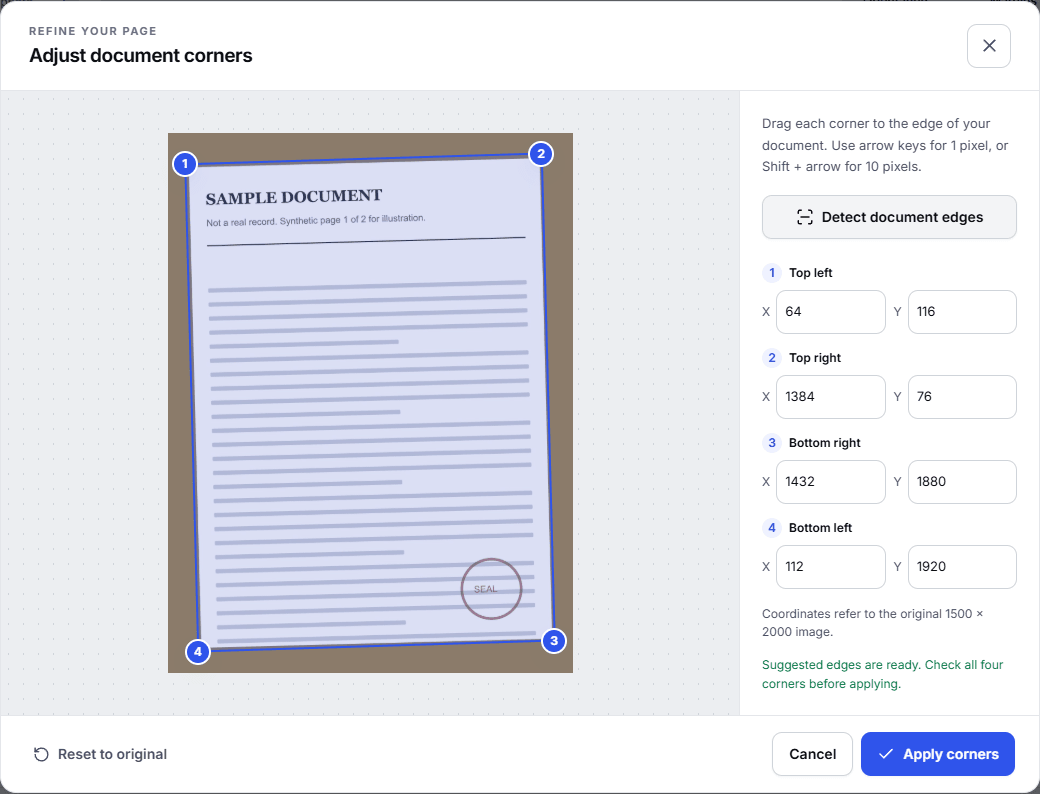
Keeping all the pages of one document together, in order, in one file is easier for an officer to review than a pile of single-page images. iPhone photos saved as HEIC need converting to JPG first, and Convert to JPG does that in your browser.
Bring a large file under 12 MB
Typed documents, such as a statement downloaded from your bank, are usually small. Size comes from images: a scanned page is a photograph of paper, and one phone photo can be several megabytes. Ten scanned pages can pass 12 MB easily.
Fix it at the source if you can: scan again at 300 dpi instead of 600, or in grayscale instead of color for black-and-white documents. If you only have the PDF, use Compress PDF:
- Add the PDF and choose Meet a size limit. Enter 11 and choose MB, which leaves some room under the 12 MB limit.
- For a scan, leave Preserve searchable text and document features off, because a scan has no real text to protect. For a typed PDF such as a statement, turn it on so the text stays sharp and searchable.
- Select Compress PDF and compare the result with the original in the preview. Zoom into the smallest print, the dates and any stamps.
- Download the new file and check its size.
Compress PDF uploads the file to our server when you start, takes files up to 30 MB, and deletes the temporary copy when the job finishes. A scan larger than that, or one that cannot get under 12 MB without becoming hard to read, is better uploaded in parts. Split PDF divides it in your browser, and names such as “Tax-return-2025-part-1-of-2.pdf” show which parts belong together. The tips page sets a size limit for each file but does not state a limit on how many files you upload.
Stop as soon as the file fits. Evidence an officer cannot read does not help your case, so a file just under the limit is better than the smallest file the tool can make.
Remove a password before you upload
Statements and tax documents downloaded from online accounts sometimes arrive password-protected. USCIS asks you not to upload encrypted or password-protected files, so remove the protection first. The simplest route is often to download the document again and choose an option without a password, if the site offers one.
If the file asks for a password when it opens and you know that password, Unlock PDF saves an unprotected copy. It runs on our server and deletes the temporary copy when the job finishes. It does not recover forgotten passwords.
Translations and passport-style photos
For every document that is not in English, USCIS asks for three things: the original document, a certified English translation and the translator’s certificate. Keep each set easy to match. Either give the three files names that start the same way, such as “Birth-certificate-original.pdf”, “Birth-certificate-translation.pdf” and “Birth-certificate-translator-certificate.pdf”, or combine them in that order into one PDF with Merge PDF, which runs in your browser. Check that a combined file is still 12 MB or smaller.
If your form needs passport-style photos, USCIS says to scan them or take a picture with your phone. Photograph a printed photo on a flat surface in even light, without glare, and convert the picture to JPG if your phone saved it as HEIC. Do not retouch it or add filters.
Name files so you can find them later
The only naming advice on the USCIS page is for the form PDF, which it asks you to save with a clear, descriptive title. The same habit helps with evidence. A name like “Marriage-certificate.pdf” or “Lease-2025-2026.pdf” tells the officer what a file is before it opens, and helps you find it again if USCIS asks for more. Short names made of letters, numbers and hyphens are the safest choice for any upload form.
Check every file before you upload
- It opens without a password.
- It is a PDF, JPG or JPEG, or TIF or TIFF if your form accepts them.
- It is 12 MB or smaller, as shown in the file’s properties.
- Every page is there, in order. Organize PDF shows each page as a numbered thumbnail, which makes a missing back page obvious. It opens the file in your browser and does not upload it.
- Every page is readable at 100% zoom, including stamps and handwriting.
- Each translation is uploaded with its original and the translator’s certificate.
If you upload the form itself as a PDF
For some forms, USCIS lets you complete the official PDF form and upload it instead of answering the questions online. USCIS recommends Adobe Acrobat Reader version 10.0 or later for completing its PDF forms. Fill in the form there and upload it as it is. Do not run the form through compressors, converters or editors, ours included: rewriting the file can change how its fields are stored. The tools in this guide are for your evidence, not for the form.
Frequently asked questions
Does USCIS accept Word files or PNG images?
Not as a rule. The tips page says files generally must be PDF, JPG or JPEG, with TIF or TIFF accepted for some forms. Save a Word document as a PDF from Word, or convert it with Word to PDF. A PNG can go into a PDF with JPG to PDF, or become a JPG with Convert to JPG.
Will compressing make my evidence harder to read?
It can if you push it too far. Compress only until the file is under the limit, compare the result with the original, and read the smallest text before you upload. Keep the original either way.
My file is under 12 MB and still will not upload. What now?
Check that it opens without a password and is not damaged. A file that will not open on your own computer will not work for USCIS either, and Repair PDF can sometimes recover it. Then try another browser. Our PDF upload troubleshooting checklist covers the remaining causes, and the USCIS Contact Center can help with problems in your account.
Can PDF Logic file my application?
No. Our tools convert, combine, shrink and check files. Filing happens in your USCIS online account, and the form instructions decide which evidence your case needs.
Try it
Tools for this guide
Each one is free and works without an account.
Spotted a mistake or something out of date? Tell us and we will fix it. Our editorial policy explains how these guides are written.